
Lyra Video Editor

Multi-Track Editor & Templates

Build social videos from templates, timeline layers, live preview, device views, and editable tracks.

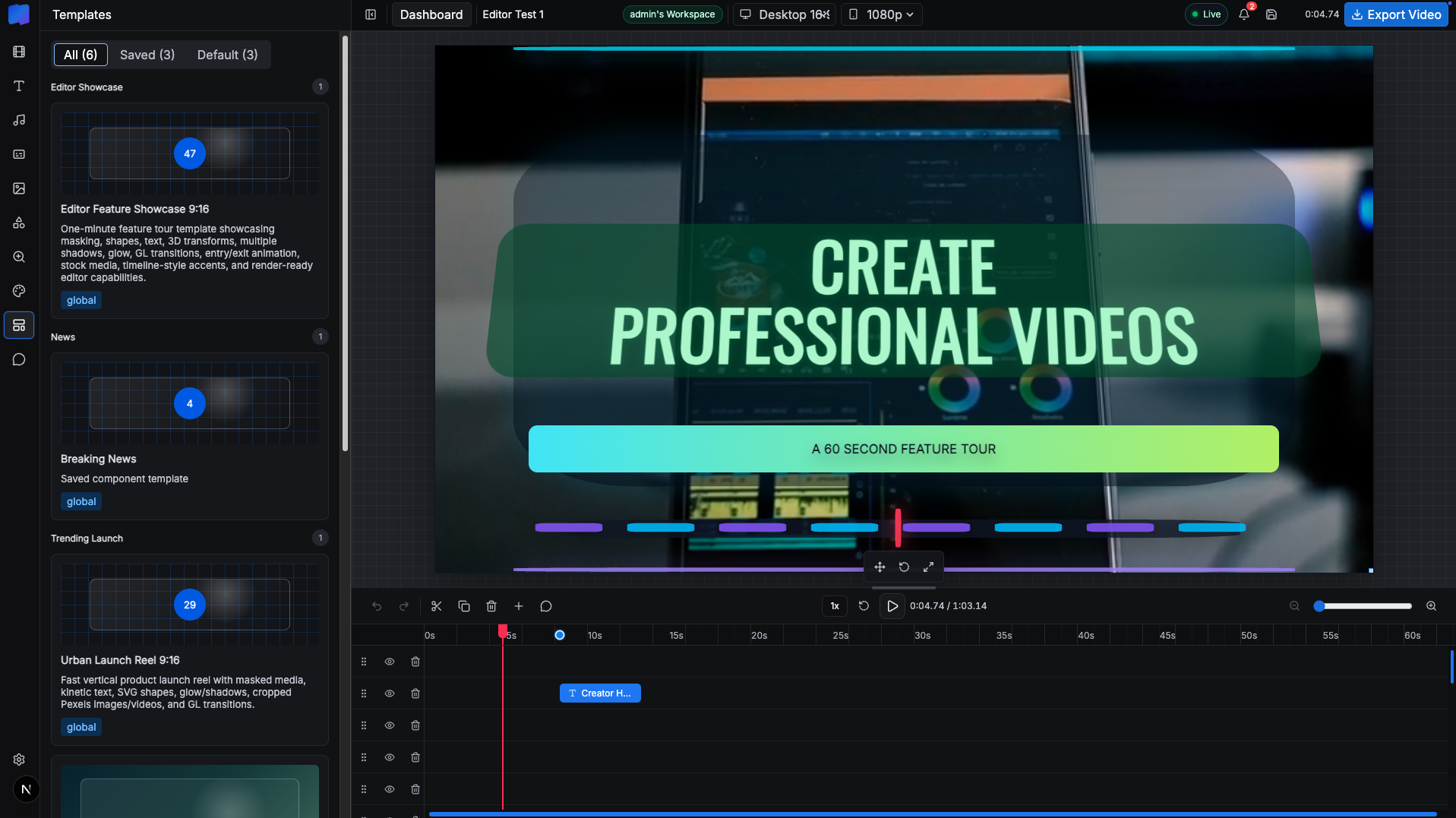
The core editor includes a template sidebar, canvas workspace, preview playback, layer rows, timeline zoom, track visibility, undo/redo, save controls, duplicate/delete actions, aspect controls, resolution controls, and live workspace status.

16:9, 9:16, 1:1, and 4:5 aspect ratios 720p, 1080p, 1440p, and 4K profiles Project templates and saved component templates Track order and hidden-track state Floating layer inspector
Ask about this feature All features

Feature details

What is included.

The editor has panels for video, text, audio, captions, images, shapes, zoom, background, templates, comments, and settings, with timeline item types for media, text, caption, shape, and zoom.

Templates are split into global, workspace, saved, and default categories so teams can start from reusable campaign layouts and component presets.

  • Template library with global and workspace templates
  • Canvas preview with desktop/mobile/square/social aspect ratios
  • Timeline tracks with visibility, ordering, zoom, and selection controls
  • Undo, redo, save, duplicate, rotate, delete, and focus tools

Included capabilities

16:9, 9:16, 1:1, and 4:5 aspect ratios 720p, 1080p, 1440p, and 4K profiles Project templates and saved component templates Track order and hidden-track state Floating layer inspector
Product page Pricing table

Ask about Multi-Track Editor & Templates

Tell us how this feature should work for your team, product package, or white-label customer.

Detailed feature breakdown

How Multi-Track Editor & Templates works inside Lyra Video Editor.

This section explains the actual workflow, controls, and buyer value behind this feature.

Editor workspace and project model

This feature is not just a visual template picker. The editor is a complete multi-panel workspace with Video, Text, Audio, Caption, Image, Shape, Zoom, Background, Templates, Comments, and Settings panels. That means the template workflow can create a real editable project instead of a static preview.

Each project carries aspect ratio, resolution, FPS, duration, background, global zoom settings, track order, hidden tracks, media assets, and timeline items. This is why the editor can keep templates, timeline layers, preview state, and export settings connected in one workspace.

  • Project state includes aspect ratio, resolution, FPS, duration, background, zoom, track order, hidden tracks, assets, and items.
  • Supported aspect ratios are 16:9, 9:16, 1:1, and 4:5 for landscape, vertical, square, and social formats.
  • Supported output presets are 720p, 1080p, 1440p, and 4K, with profile dimensions generated from the selected aspect ratio.

Timeline layers and editable tracks

The timeline is built around typed TimelineItem records. A layer can be video, image, audio, text, caption, shape, or zoom. Every layer stores its track, start time, duration, source trim data, asset reference, text or caption words, style object, mask settings, animations, transitions, 3D layout, visibility state, volume, mute, and audio fade values.

The UI gives editors real production controls: undo, redo, split selected layers, clone selected layers, delete selected layers, add tracks, resize the timeline, zoom the timeline from 1x to 24x, drag media files into lanes, reorder tracks, hide tracks, and delete track items.

  • Default track model includes Text, Captions, Video/Image, Effects, and Audio.
  • Layer placement prevents accidental overlap by moving new or duplicated items onto safe tracks when required.
  • Timeline drag/drop calculates the target track and start time from pointer position, then blocks invalid placements.

Templates that become real editable projects

The Templates panel combines default project templates with saved global and workspace templates. The UI segments templates into All, Saved, and Default, then groups saved templates by category.

Default templates such as Sport, Intro Example, and Launch Clip create real title and caption timeline layers with background styles. Saved templates clone the original project assets, clone visible timeline items, remap asset IDs, preserve relative timing, move layers into new tracks, extend the project duration if needed, and select the first cloned layer for immediate editing.

  • Text templates include preset typography styles such as Modern Title, Impact Statement, Sliced Text, Neon Glow, Arabic Title, and Urdu Nastaliq.
  • Saved templates store a full project JSON payload, not only a thumbnail or title.
  • Applying a saved template clones assets and timeline layers so the source template remains reusable.

Persistence, package limits, and team safety

The editor keeps project work persistent through local drafts, server autosave, stale revision checks, recovery drafts, and explicit save actions. The same project model is used when a workspace saves a template, so teams can package working layouts for reuse.

Package enforcement is tied into project creation, save, and render paths. The product checks project duration, allowed resolution, monthly render usage, parallel render jobs, and workspace storage before letting a workspace exceed its subscription limits.

  • Template tables store categories and editor templates with global or workspace scope.
  • Template APIs load active templates by global/workspace scope and save or archive templates.
  • Project save and render checks enforce maximum project duration and allowed resolutions.

Screenshots

Multi-Track Editor & Templates in the actual product.

Main editor shell with templates, canvas, resolution controls, live status, export button, and timeline layers.

More Lyra Video Editor features

Related feature pages.

Media Library, Stock Search & AI Assets

Creators can search Pexels, upload local assets, generate AI visuals, and add image, video, and audio items directly to the timeline without leaving the editor.

Open feature

Captions, Audio & AI Voice

Lyra Video Editor supports caption layers, SRT upload, generated caption words, text-to-speech, uploaded audio, volume controls, mute, fade-in, and fade-out controls for timeline audio and video.

Open feature

Motion, Effects, Shapes & Masking

The editor includes deep visual controls for motion and styling: 121 GL transitions, 13 entry/exit animation options, nine 3D layouts, 1,151 SVG shapes, 82 mask SVGs, solid and gradient backgrounds, filter presets, shadow stacks, glow controls, and zoom target items.

Open feature

Rendering & Export Controls

Lyra Video Editor uses Remotion for video output, exposes export settings for aspect and resolution, shows render progress, and supports package-aware limits for maximum duration and allowed resolutions.

Open feature

Collaboration, Workspaces & Comments

The product includes collaborative workspace infrastructure: owner/admin/member roles, project-level view/edit/render permissions, team invitations, comments, archived threads, unread counts, notifications, and live editor presence.

Open feature

API Keys, Super Admin & Package Control

Lyra Video Editor supports both super-admin-managed provider keys and user-owned keys, plus workspace packages, package limits, SMTP settings, notifications, impersonation, user administration, reset password flows, and package-aware editor limits.

Open feature