Lyra Video Editor

Rendering & Export Controls

Render social videos to H.264 MP4 through Remotion with view, resolution, FPS, and progress controls.

Lyra Video Editor uses Remotion for video output, exposes export settings for aspect and resolution, shows render progress, and supports package-aware limits for maximum duration and allowed resolutions.

H.264 MP4 output 30 fps default profile 720p to 4K export presets Render job APIs Package-aware export limits
Ask about this feature All features

Feature details

What is included.

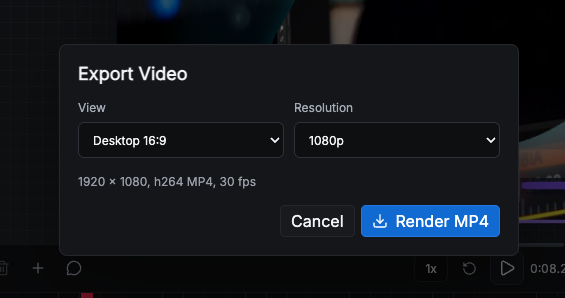
The export dialog lets users choose Desktop 16:9, Mobile 9:16, Square 1:1, or Social 4:5 and render at 720p, 1080p, 1440p, or 4K.

Server code checks package limits before project persistence and rendering so workspaces cannot exceed configured duration or resolution entitlements.

  • Remotion MP4 rendering
  • Aspect and resolution export controls
  • Render progress with rendered/encoded frame metadata
  • Package checks for project duration and allowed resolutions

Included capabilities

H.264 MP4 output 30 fps default profile 720p to 4K export presets Render job APIs Package-aware export limits
Product page Pricing table

Ask about Rendering & Export Controls

Tell us how this feature should work for your team, product package, or white-label customer.

Detailed feature breakdown

How Rendering & Export Controls works inside Lyra Video Editor.

This section explains the actual workflow, controls, and buyer value behind this feature.

Export profiles for social formats

The export workflow supports the common social video views: desktop landscape, mobile vertical, square, and social portrait. Resolution profiles cover 720p, 1080p, 1440p, and 4K, with dimensions generated from the selected aspect ratio.

  • 16:9, 9:16, 1:1, and 4:5 formats are available for platform-specific output.
  • Resolution controls map each aspect ratio to the correct output dimensions.
  • The default profile targets MP4 output suitable for publishing.

Remotion rendering with progress visibility

Rendering uses a production render job flow rather than a simple browser download. Users can start an export, see progress, review encoded frame information, and return to the project while the output is produced.

  • Render progress can expose percent and frame metadata.
  • Output jobs are separate from edit state so saving and rendering stay controlled.
  • H.264 MP4 output supports standard social publishing workflows.

Package-aware export governance

Workspace packages can restrict maximum project duration, allowed resolutions, monthly renders, and parallel render jobs. This lets the product be sold as a subscription SaaS without giving every plan unlimited render capacity.

  • Allowed resolution checks protect premium export tiers.
  • Maximum duration rules prevent unexpectedly heavy render jobs.
  • Parallel render limits help keep platform capacity predictable.

Screenshots

Rendering & Export Controls in the actual product.

Export dialog with view, resolution, MP4 metadata, and render action.

More Lyra Video Editor features

Related feature pages.

Multi-Track Editor & Templates

The core editor includes a template sidebar, canvas workspace, preview playback, layer rows, timeline zoom, track visibility, undo/redo, save controls, duplicate/delete actions, aspect controls, resolution controls, and live workspace status.

Open feature

Media Library, Stock Search & AI Assets

Creators can search Pexels, upload local assets, generate AI visuals, and add image, video, and audio items directly to the timeline without leaving the editor.

Open feature

Captions, Audio & AI Voice

Lyra Video Editor supports caption layers, SRT upload, generated caption words, text-to-speech, uploaded audio, volume controls, mute, fade-in, and fade-out controls for timeline audio and video.

Open feature

Motion, Effects, Shapes & Masking

The editor includes deep visual controls for motion and styling: 121 GL transitions, 13 entry/exit animation options, nine 3D layouts, 1,151 SVG shapes, 82 mask SVGs, solid and gradient backgrounds, filter presets, shadow stacks, glow controls, and zoom target items.

Open feature

Collaboration, Workspaces & Comments

The product includes collaborative workspace infrastructure: owner/admin/member roles, project-level view/edit/render permissions, team invitations, comments, archived threads, unread counts, notifications, and live editor presence.

Open feature

API Keys, Super Admin & Package Control

Lyra Video Editor supports both super-admin-managed provider keys and user-owned keys, plus workspace packages, package limits, SMTP settings, notifications, impersonation, user administration, reset password flows, and package-aware editor limits.

Open feature